Dispatch with context
Bring the task, location, procedure, parts, and asset history together.
Use it on a phone or a tablet. Supervisors also get a cockpit for the crew.
TwinEdge Field is AI-native mobile work. Carry the job, the map, parts, and Ask TwinEdge AI on a phone or a tablet. A supervisor cockpit sits beside that for crew and dispatch. Closeout writes back to the CMMS — even offline.
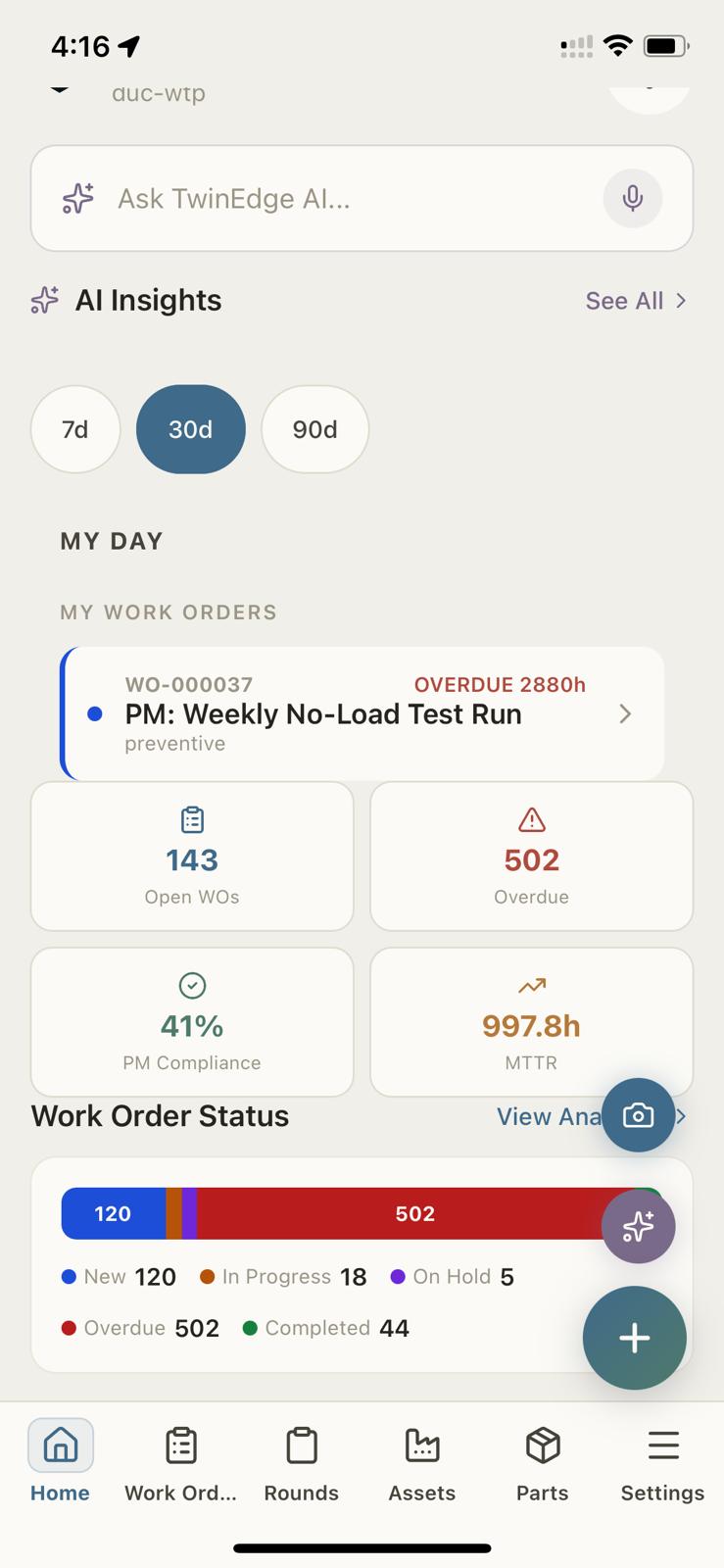
Open work, overdue jobs, PM compliance, and Ask TwinEdge AI sit on the home screen.
Bring the task, location, procedure, parts, and asset history together.
Add photos, measurements, notes, and guided equipment screening to the visit.
Sync work status, time, cost, and evidence back to AssetOps and the operating record.
Review the work package and job readiness before dispatch.
Keep observations attached to the equipment and work order.
Carry work into the field and synchronize the result.
Select a screen to explore the workflow. Open it for a closer look.
Ask about overdue work, asset health, or the next check without leaving the job.
Assignments, checklists, routes, scan-to-asset, notes, photos, and status changes.
Telemetry, remaining-life estimates, recent recommendations, history, procedures, and safety requirements arrive with the job.
Guided audible sound, phone IMU vibration, camera, OCR, and operating-context capture create repeatable field evidence.
Capture quality, possible condition, confidence, limitations, model trace, technician review, and evidence hashes stay connected.
Sessions, artifacts, feature summaries, findings, conflicts, and work drafts remain local until approved synchronization succeeds.
Before-and-after captures compare sound, vibration, visual context, quality, and baseline change without replacing professional verification.
Ask TwinEdge AI. Ask about overdue work, asset health, or the next check. The assistant stays on the same record as the job.
Job readiness before dispatch. See missing certificates, parts, and sync state so a blocked job is not sent to the field.
Map, hierarchy, and parts. Find the asset on the map, walk the plant hierarchy, and check stock or reorder with the job.
Supervisor cockpit. Crew, dispatch, weekly schedule, and exceptions sit in a cockpit next to the technician workflow — on the same product.
Keep source context available as the workflow moves between teams and applications.
TwinEdge Field
TwinEdge Field is the mobile execution and diagnostics product for maintenance and operations teams. It combines work, dispatch, routes, inventory, asset context, guided equipment screening, safety, evidence capture, and closeout for technicians and supervisors.
Yes. Offline work packets can preserve assigned work, asset details, procedures, routes, diagnostics, notes, photos, measurements, and closeout evidence until an approved connection is available.
Assignments and platform diagnostic context move from AssetOps to the field workflow. Reviewed mobile findings, readings, photos, notes, safety evidence, follow-up work, and closeout records synchronize back to the asset and work history.
Yes. TwinEdge Field runs on both. Carry work orders, the map, parts, job readiness, Ask TwinEdge AI, and equipment screening on the device you already use. The same product also includes a supervisor cockpit for crew, dispatch, and the week’s board.
Yes. Technicians get the job, the map, parts, diagnostics, and closeout. Supervisors get a cockpit for scheduling, dispatch, readiness, routes, crew, and exceptions. Both write back to the same AssetOps record.
Field workflows can capture guided audible sound, contact vibration from the phone IMU, gauge and controller displays, nameplates, context photos, OCR confirmations, measurements, notes, signatures, safety gates, and work evidence.
Asset-aware workflows support rotating equipment such as pumps, motors, fans and blowers, compressors, generators, HVAC equipment, cabinet fans, valves, compressed-air systems, and vacuum systems. Available recipes depend on the asset, session goal, tenant policy, device capability, and operating context.
No. TwinEdge Field provides repeatable maintenance screening and auditable evidence using mobile-device capabilities. It does not claim certified vibration analysis, certified sound-level measurement, ultrasonic detection from a standard phone microphone, electrical or gas measurement, or a final root-cause or safe-to-operate determination.
Capture-quality gates, device and model readiness, confidence, limitations, evidence contributors, model trace, tenant policy, and technician review remain attached to each finding. Operational changes and follow-up work require confirmation rather than silent mutation.
Discuss your sources, assets, and the outcomes your team wants to improve.